عضویتها و پرداخت دورهای
سطوح عضویت با خدمات مشمول و قیمت ویژه اعضا، با پرداخت خودکار.
Memberships turn regular clients into predictable monthly revenue. Each tier sets a price and billing period, the treatments included each month, member discounts on treatments and retail, and any perks. With Stripe connected, members pay automatically each period.
Memberships need the Memberships feature switched on in Settings > Aesthetic Clinic > Client records.
مراحل
Create your tiers
Go to Settings > Memberships and tap Add plan. Give the tier a name and description, a price and billing period (weekly, fortnightly or monthly), and a minimum term. Set how many treatments are included each month and which services count, the member discount on treatments and on retail, and any perks you want staff to see.
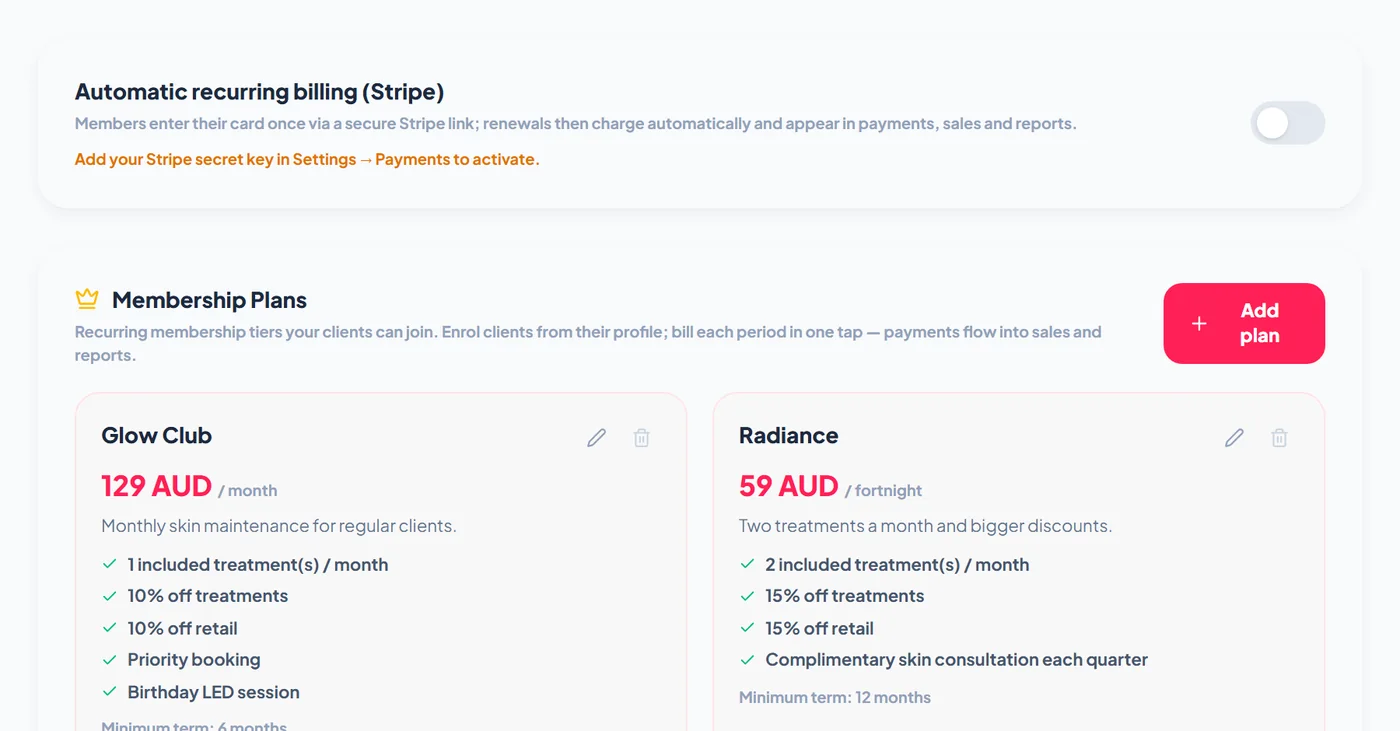
Turn on automatic billing
Switch on Automatic recurring billing (Stripe). Members enter their card once through a secure Stripe link, and each renewal is then charged automatically and appears in payments, sales and reports. This needs your Stripe secret key in Settings > Payments.
Enrol a client
Open the client and tap Enrol in a membership on their Overview, or sell the plan at the POS: a plan linked to a POS service enrols the client when that service is checked out. The membership card on the profile shows the tier, when they joined, their payments, and Pause, Resume and Cancel membership. Without automatic billing, Bill now records the payment for each period in one tap, and Set up auto-pay sends the Stripe card link.
Redeem inclusions and apply member pricing
The membership card shows Included treatments this month. When a member uses one, tap Redeem inclusion to record it, and the allowance counts down for the month. At the POS a member badge appears for an active member, and one tap adds their member discount to the sale.