Salon software ยท feature guide

Salon software features: what to look for in 2026

Booking, the till, staff, targets, tips, packages, loyalty, reports and marketing should live in one app, not five. This guide lists the features to check before you choose salon software, with screenshots of how ZibaDesk handles each one.

Most salons end up with a booking app, a separate card terminal, a spreadsheet for commission, a loyalty card in a drawer and a text message tool nobody quite trusts. Each one works on its own. Together they mean typing the same client twice, working out pay by hand on a Sunday night, and never knowing whether a stylist is on track for the month.

The questions salon owners search before buying are specific: which salon software has the best staff target features? Built-in tipping? Memberships and packages? Reporting that works across more than one location? Below we answer each one, with screenshots from a sample salon in ZibaDesk.

If you run skin, lash or injectable treatments as well, read the aesthetic clinic software features guide too. For how easy each system is for your team, see the easiest salon software for staff.

The salon software feature checklist

Use this as a buying checklist. These are the features that separate salon management software from a booking widget.

What to look for in salon software, and what ZibaDesk includes.
Feature to look forWhy it mattersZibaDesk
Built-in online bookingClients book 24/7 from your own page, with deposits and remindersIncluded
Staff management & rostersWorking hours, roles and PINs, staff-level prices, all in the same calendarIncluded
Staff sales targetsWeekly or monthly targets per stylist, with progress and historyIncluded
Commission, chair rent & payrollCommission, per-service rates, chair rent, or rent plus commissionIncluded
Tipping at checkoutPreset tip buttons or any amount, recorded with the saleIncluded
Split paymentsOne sale paid partly by card and partly by cashIncluded
Packages & gift cardsPrepaid visits and gift cards with balances that stay rightIncluded
Loyalty pointsPoints on every visit, shown at the till and on the client profileIncluded
ReportsSales, staff, targets, payroll, clients and stock, with Excel exportIncluded
Marketing & promo codesSMS, email and WhatsApp campaigns, automations and codesIncluded
More than one locationEach branch with its own hours, staff and reportsUp to 5 on Ultra
Consent forms & treatment plansFor salons that also offer skin, lash or clinical treatmentsWith clinic mode (Ultra)

The features that matter, one by one

Each one answers a question salon owners ask before they buy. Screenshots are from a sample salon.

๐Ÿ“…

Online booking that is part of the salon, not a widget on top

Every salon gets its own booking page built from your real services, prices and staff. Clients pick a service, a stylist and a time, pay a deposit through Stripe if you ask for one, and get reminders before the visit. You can limit services to certain weekdays, offer a waitlist when the day is full, and accept promo codes. Bookings land straight in the same calendar the team works from.
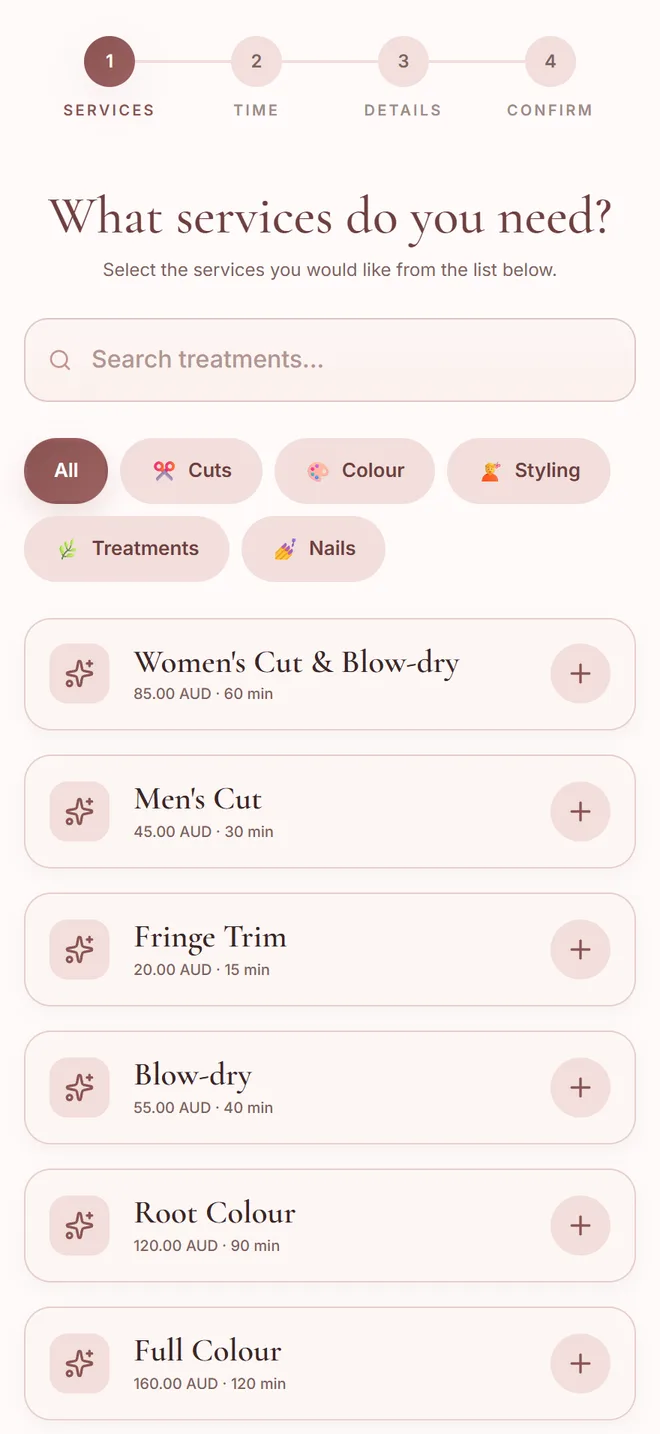
A salon booking page on a phone, listing services with price and duration
The booking page clients see on their phone, with categories and prices.
๐Ÿ‘ฅ

Staff management that runs from the same screen

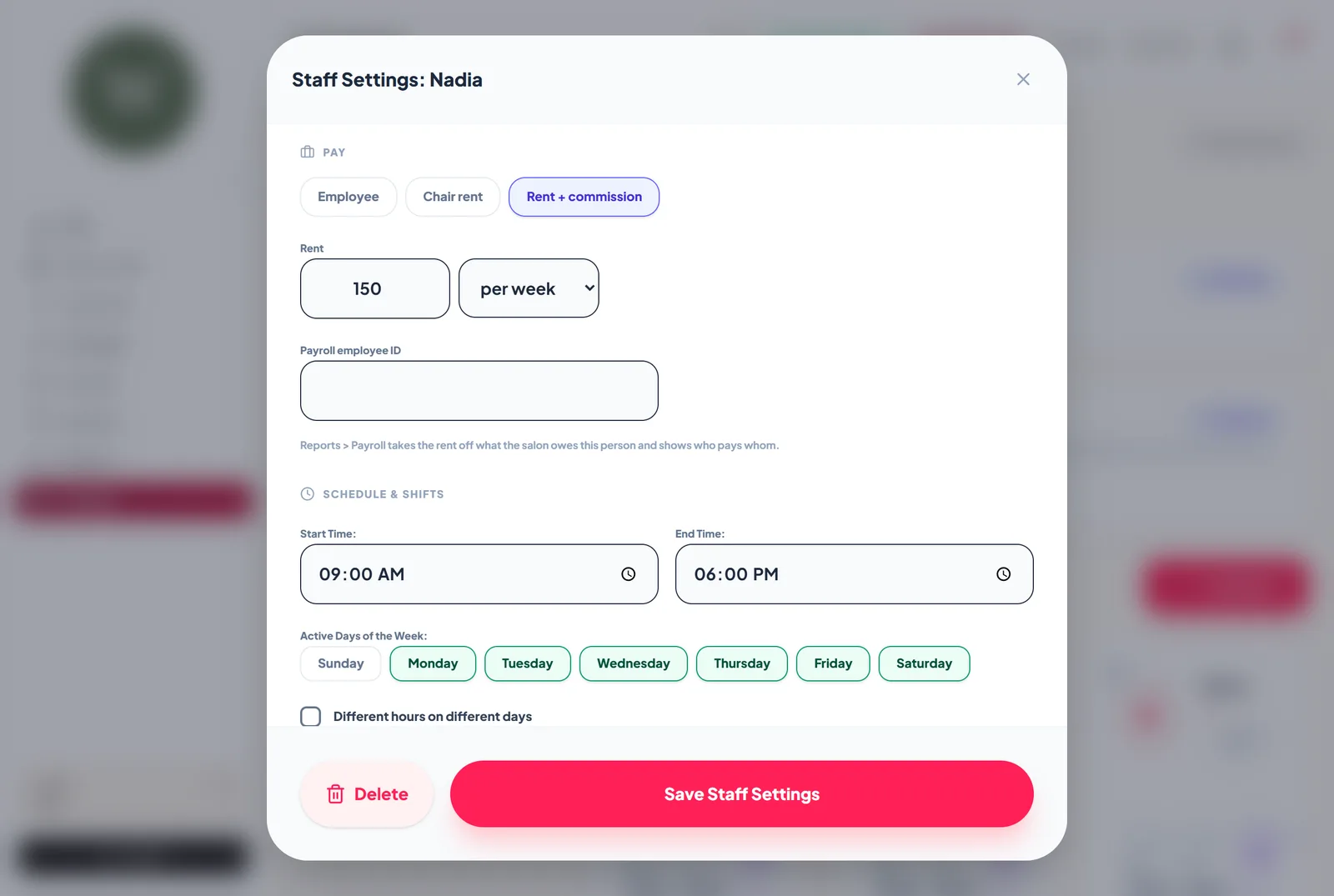
Each stylist has working hours and breaks, the services they do, a role and a PIN that decides what they can open, and a staff level so a senior stylist can charge more for the same cut. Pay can be commission, a rate per service, chair rent per day, week or month, or rent plus commission. The Salon Center board shows who is free, who is with a client and who is waiting, and every stylist can see their own bookings in their phone calendar. See staff and permissions and rosters.
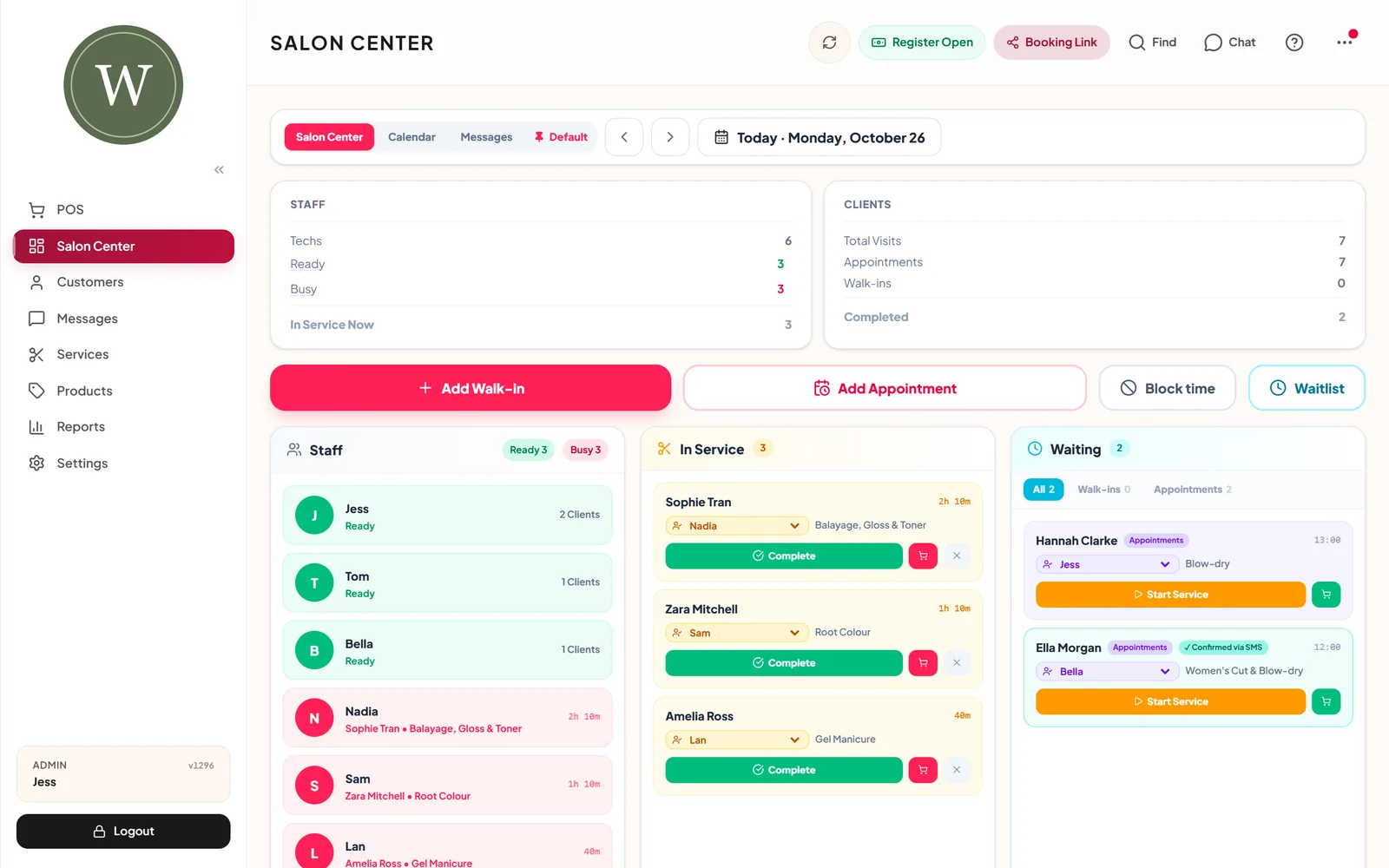
Salon Center board showing staff who are ready or busy, clients in service and clients waiting
Salon Center: who is ready, who is busy, and who is waiting.
Staff settings with pay set to chair rent plus commission, 150 per week
A stylist on rent plus commission, with their working days.
๐ŸŽฏ

Staff sales targets you can actually see

Set a sales target for each stylist, per week or per month. The Targets report shows how far along each person is, how many days are left and whether they are on track or behind, and keeps a history of past periods. Team performance lists services, products and net sales per person, with the targets underneath, so a quick look on a Monday morning tells you who needs more bookings.
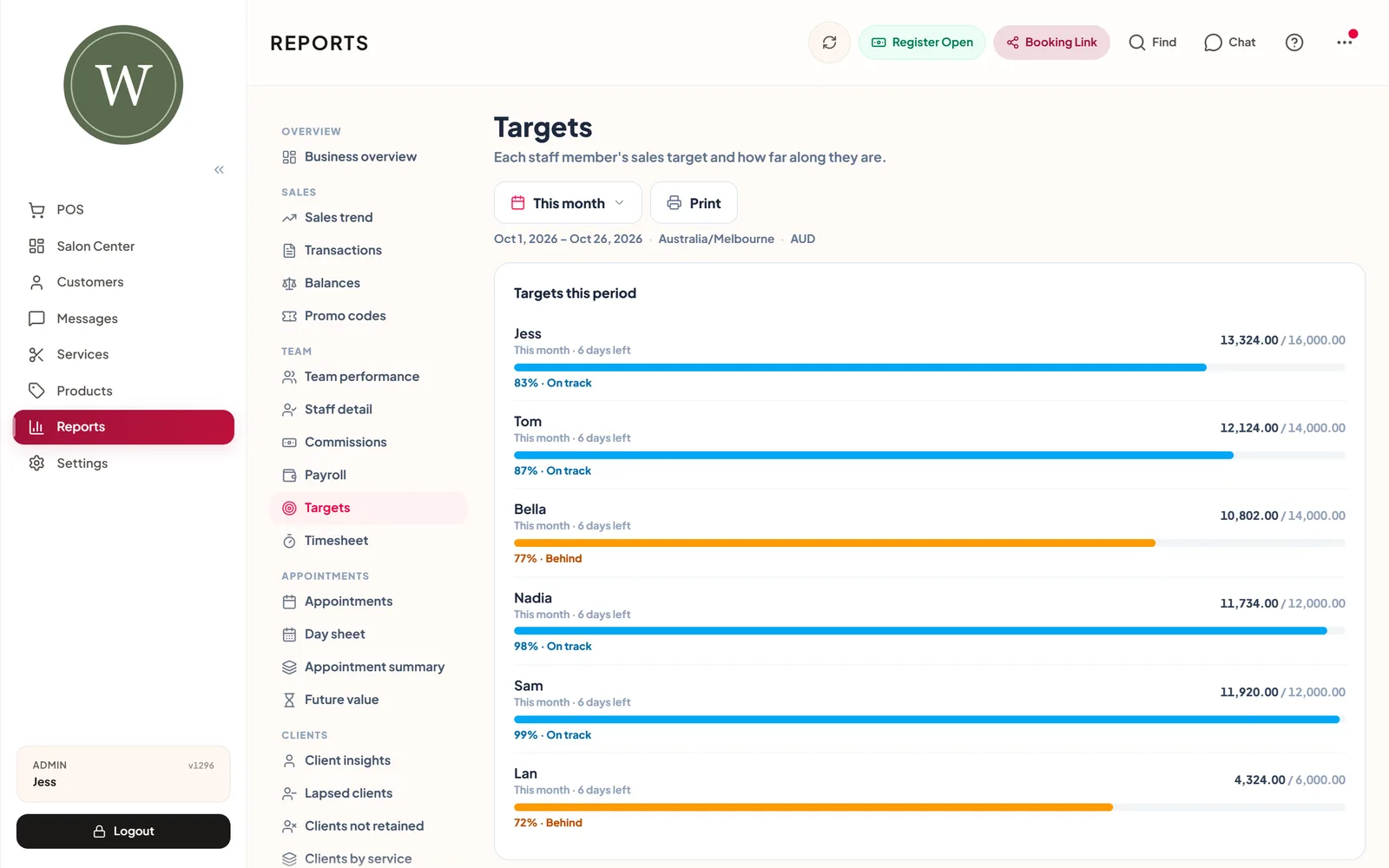
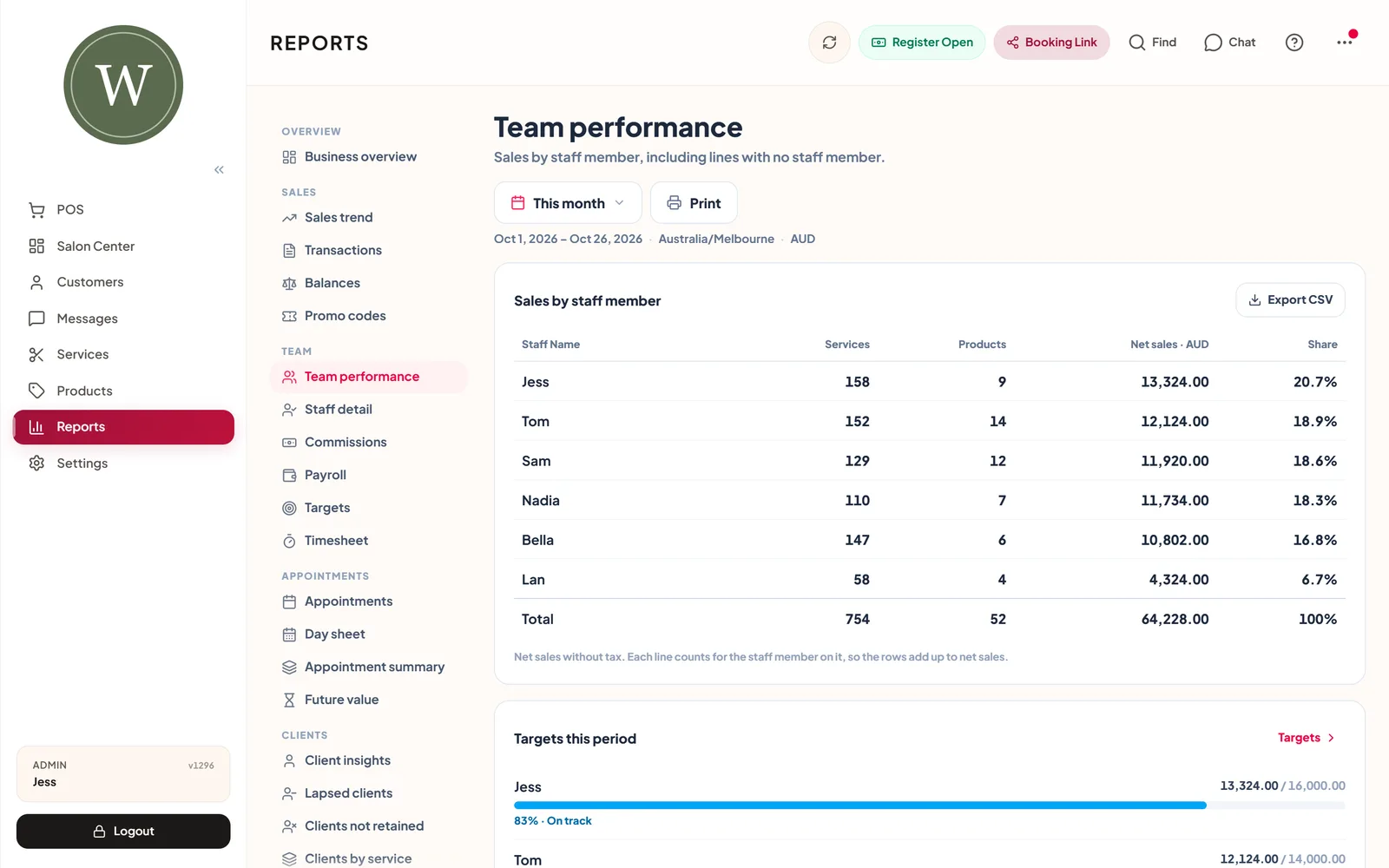
Targets report with a progress bar for each stylist, marked on track or behind
Targets: progress for each stylist this month.
Team performance report with services, products and net sales per stylist
Team performance: sales per stylist, with targets below.
๐Ÿ’ณ

Checkout with tips and split payments

The salon POS sits next to the calendar. Add services and products with the stylist on each line, apply a discount or a promo code, and let the client add a tip with preset buttons or any amount. One sale can be paid partly by card and partly by cash, and you can take card payments with Tap to Pay on iPhone and Android phones where available. Gift cards, packages and loyalty points are redeemed at the same till, and every payment closes into the day's register.
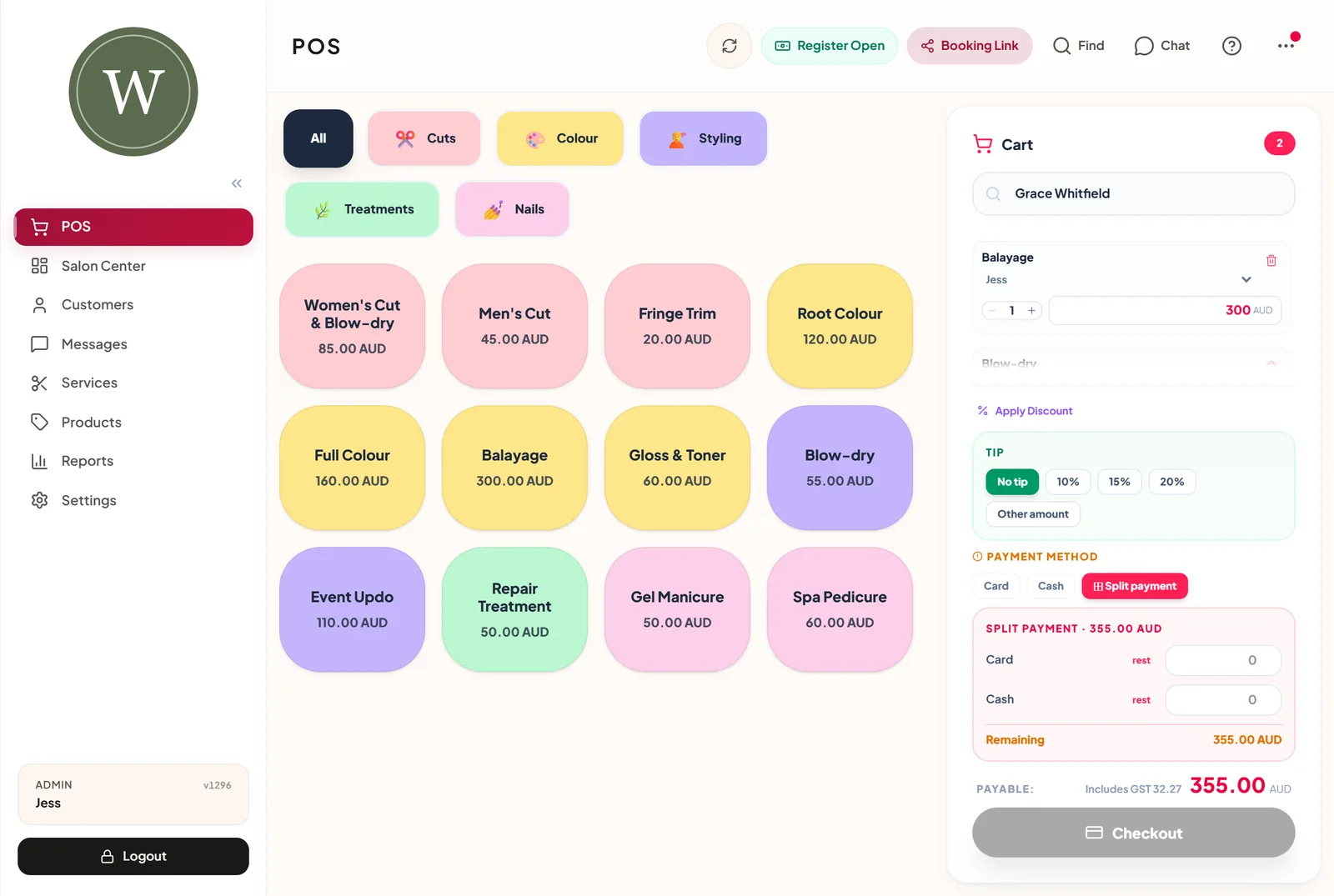
Salon POS cart with two services, tip buttons and a split payment between card and cash
One cart: two stylists, tip buttons and a split payment.
๐ŸŽ

Packages, gift cards and loyalty

Sell prepaid packages such as five blow-dries, and ZibaDesk counts down each visit. Gift cards can be sold at the till or from an online gift card shop, and the Balances report shows what is still owed: gift cards, store credit, package visits and deposits held. Clients earn loyalty points on visits and retail, and their points show at the till and on their profile. Salons that also run skin or lash treatments can switch on clinic mode on Ultra for memberships with automatic monthly billing.

๐Ÿ“Š

Reports that answer salon questions

The business overview shows net sales, average invoice, payments by method and appointments for any dates. Behind it are sales trend, transactions, team performance, staff detail, commissions, payroll, targets, timesheet, appointments, day sheet, future value already booked, lapsed and not-retained clients, clients by service, promo codes, balances and stock. Figures can include or exclude tax, everything exports to Excel, and sales can flow to Xero. See reports.
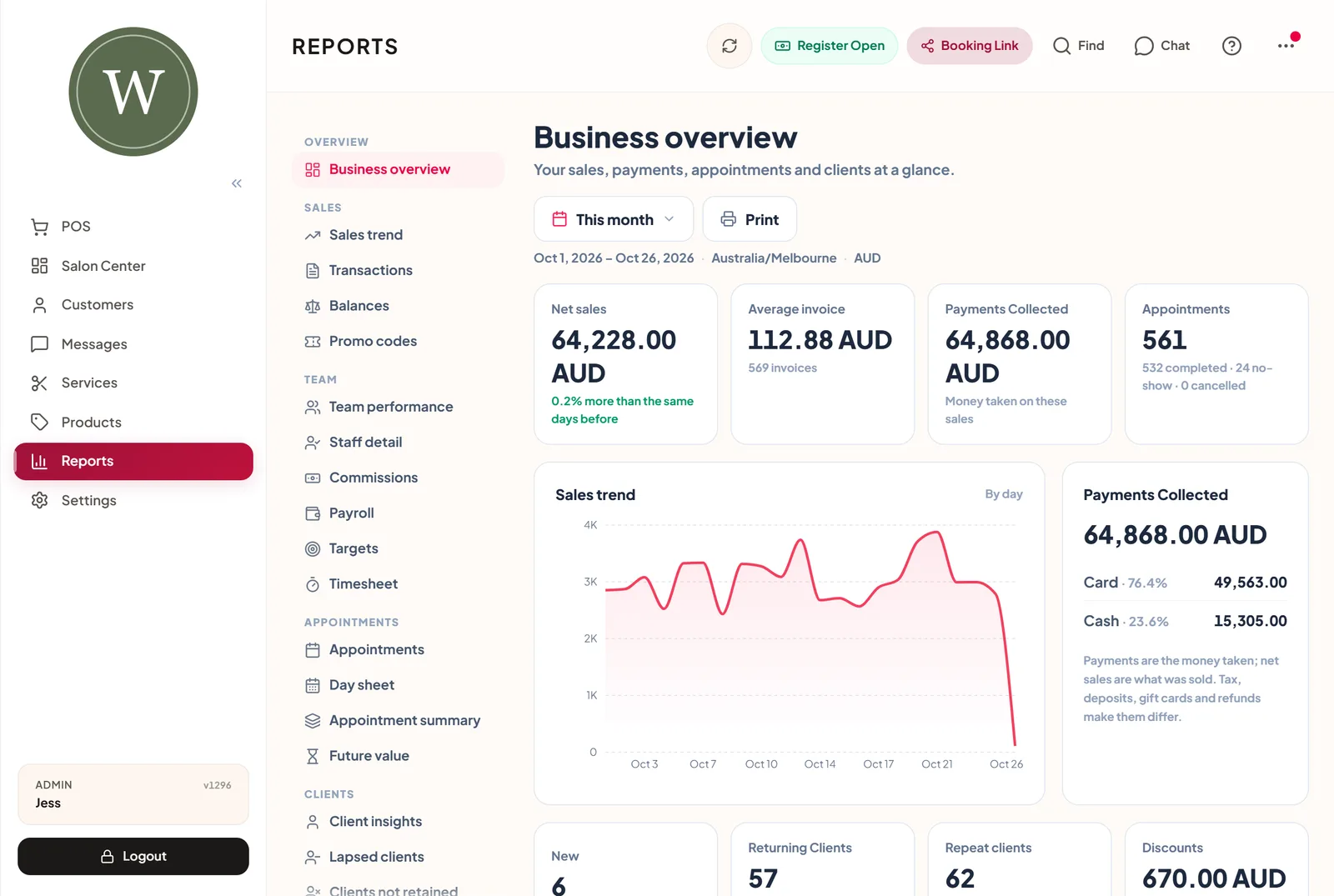
Business overview report with net sales, average invoice, payments collected and a sales trend chart
Business overview for the month so far.
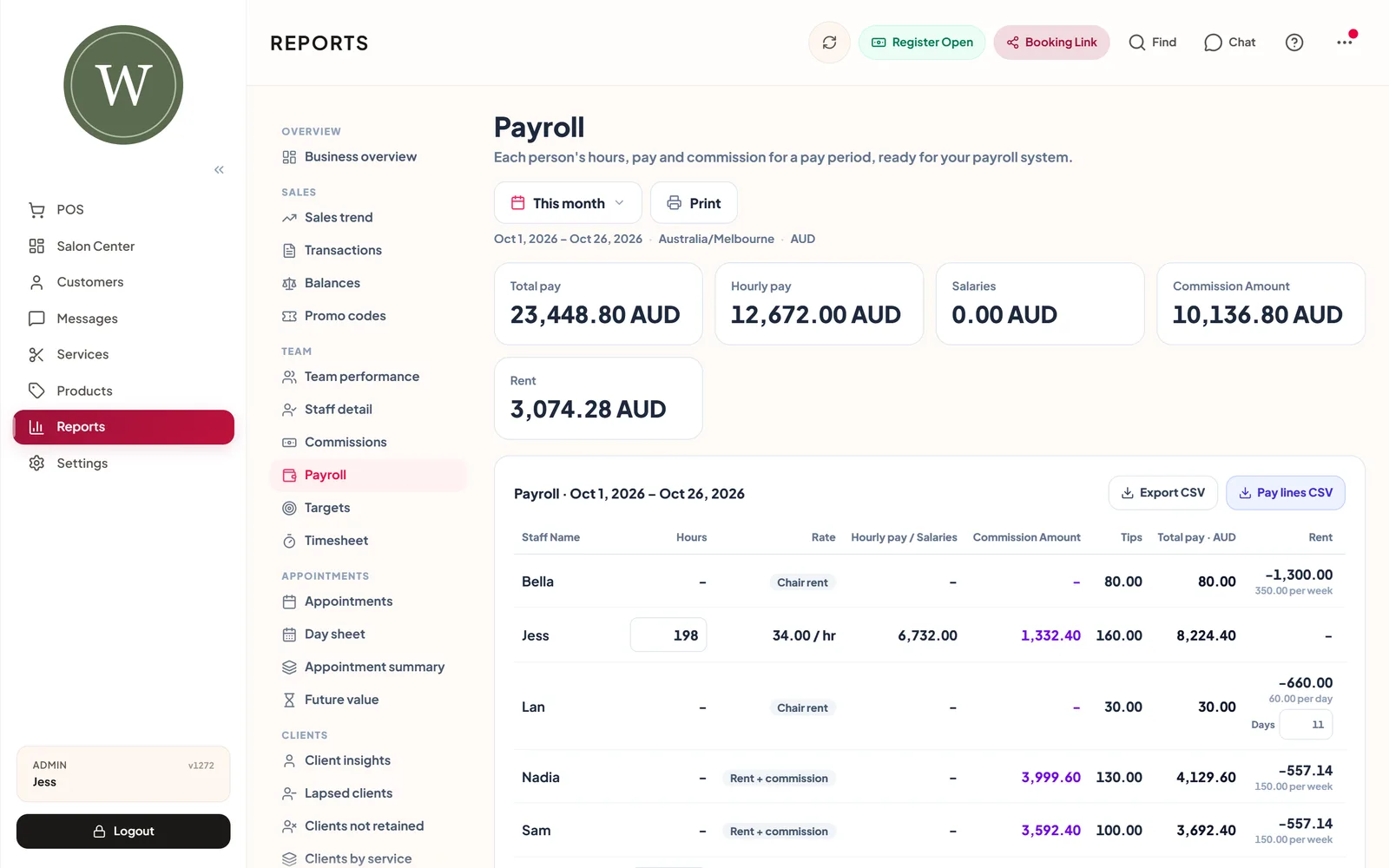
Payroll report with hours, pay and commission for each stylist
Payroll: hours, commission and chair rent for the pay period.
๐Ÿ“ฃ

Marketing that brings clients back

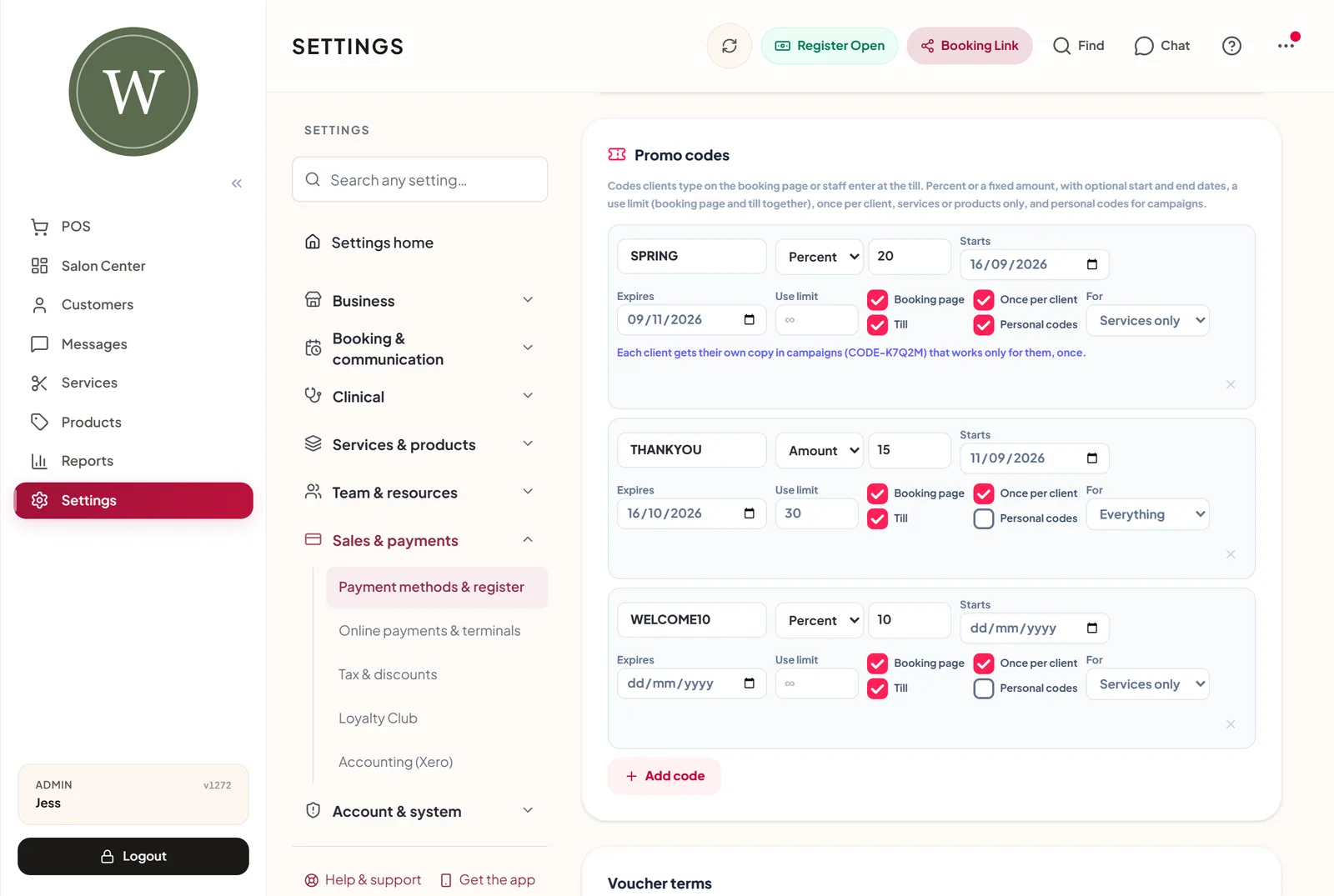
Send SMS, email and WhatsApp campaigns to the clients you choose, or let automated campaigns run on a schedule: birthdays, thank-yous to your top spenders, and win-back messages for clients who have not been in for a while. Promo codes can have a start and end date, a use limit, a once-per-client rule and personal codes for each client in a campaign. A thank-you survey after the visit collects star ratings. See reminders and campaigns.
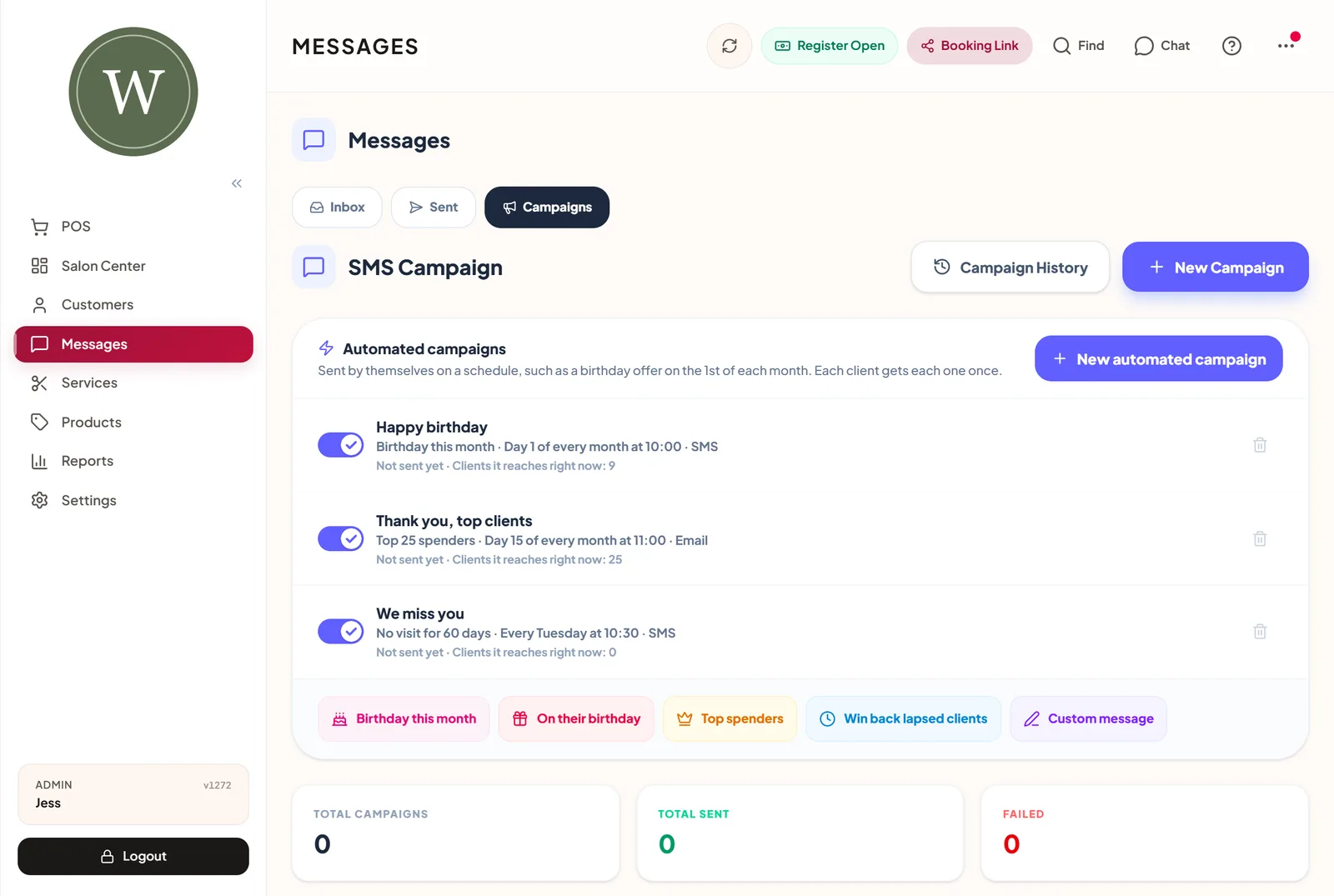
Automated campaigns for birthdays, top clients and clients who have not visited for 60 days
Automated campaigns that send themselves each month.
Promo code settings with percent and amount codes, start and end dates and a once-per-client rule
Promo codes with dates, limits and personal codes.
๐Ÿข

One salon now, more later

Start with one location on Pro (up to 5 staff). When you open a second salon, Ultra gives you up to five locations with unlimited staff: each branch has its own hours, time zone, staff and calendar colour, clients and their history are shared, and reports can be read for one branch or all of them. Nothing has to move to a different system as you grow.

Salon software: frequently asked questions

The exact questions salon owners ask before choosing, answered.

Which salon software has the best staff target features?

ZibaDesk lets you set a weekly or monthly sales target for each stylist. The Targets report shows each person's progress, days left and whether they are on track, with a history of past periods, and Team performance shows the same targets under each person's sales.

Which salon software has the best staff management features?

ZibaDesk keeps staff in the same app as bookings and the till: working hours and breaks, roles and PINs, the services each person does, staff-level prices, commission, per-service rates or chair rent, a payroll report, a timesheet of rostered against booked hours, and a calendar link for each stylist's phone.

Which salon software has built-in tipping?

ZibaDesk has tipping built into checkout. Switch it on, choose the preset percentages, and clients pick a tip or type any amount; the tip is recorded with the sale and shows in your reports.

Which salon software has the best memberships and package features?

ZibaDesk sells prepaid packages of visits and counts each one down, sells gift cards at the till and online, and shows what is still owed in the Balances report. Memberships with automatic monthly card billing come with clinic mode on the Ultra plan.

Which salon software has built-in online booking?

ZibaDesk gives every salon its own booking page built from your real services, prices and staff, with deposits through Stripe, reminders, a waitlist, weekday limits per service and promo codes, all in the same calendar the team uses.

Which salon software has the best reporting features?

ZibaDesk includes a business overview plus sales trend, transactions, team performance, commissions, payroll, targets, timesheet, appointments, future value, lapsed clients, clients by service, promo codes, balances and stock reports, with Excel export and a link to Xero.

Which salon software has the best payment features?

ZibaDesk has its own POS: card and cash, split payments, tips, discounts and promo codes, gift cards, packages and loyalty points at one till, Tap to Pay on iPhone and Android phones where available, and Stripe deposits on online bookings.

Which salon software has the best loyalty features?

ZibaDesk has a loyalty club built in: clients earn points on visits and retail, and their balance shows at checkout and on their profile, with no separate loyalty app.

Which salon software has built-in consent form features?

ZibaDesk has consent forms with on-screen signatures, sent before the visit or signed on a tablet in the salon. They come with clinic mode on the Ultra plan, made for salons that also offer skin, lash, brow or other treatments that need a signed form.

Which salon software has built-in treatment plan features?

ZibaDesk has treatment plans for courses of several sessions, with booked and not-booked sessions on each plan. They come with clinic mode on the Ultra plan, together with treatment notes, consent forms and before-and-after photos.

What salon software scales best from a single location to multiple sites?

ZibaDesk runs one location on Pro and up to five on Ultra, with unlimited staff. Each branch has its own hours, time zone and staff, clients are shared, and reports can be read per branch or for all of them, so you stay on the same system as you grow.

What is the best all-in-one salon management software?

The best all-in-one salon software puts booking, POS, staff, payroll, client records, loyalty, reports and marketing in one app. ZibaDesk does that on web, iPad, iPhone and Android, and you can try it free for 14 days.

14 days
Free trial
1 โ†’ 5
Locations as you grow
24/7
Online booking
iOS ยท Android ยท Web
Same salon everywhere

Try ZibaDesk free for 14 days

Booking, POS, staff targets, tips, packages, loyalty, reports and marketing in one app. Set up in minutes with a free 14-day trial, no credit card.

Start Your Free Trial โ†’
No credit card required ยท Cancel anytime