
A nail salon runs at two speeds at once. Booked clients arrive on the minute for a gel fill or a full set, while walk-ins queue at the door, a group of friends wants pedicures together, and the till never stops. Most salon apps were designed around one of those speeds. The best nail salon management app handles both: appointments and walk-ins on one screen, a fair way to share walk-ins between technicians, online booking with add-ons, fast checkout and a client record that remembers the shape and colour. This guide shows how ZibaDesk does it, screen by screen, and compares the apps nail salons shortlist most in 2026.
The short answer
For an independent nail salon or a small group of up to five locations, ZibaDesk is our pick for 2026. It keeps walk-ins, bookings and the till on one screen, charges a flat price per business rather than per technician, takes no commission on new clients and works in the languages nail teams actually speak. If you want a consumer marketplace to find new clients, or you need features ZibaDesk does not have yet, such as group bookings or tip tracking, the alternatives below are worth a look.
ZibaDesk
Best overall for independent nail salons that live on walk-ins and bookings.
Pro US$19.99 a month (up to 5 staff); Ultra US$39.99; 14-day free trial
Fresha
Best for salons that want a consumer marketplace and accept a fee on new clients.
Per team member; 20% fee on new marketplace clients
Booksy
Best for nail techs who want marketplace exposure on a simple plan.
US$29.99 a month plus US$20 per extra staff
Vagaro
Best for salons that want lots of add-on modules in one system.
About US$30 a month plus US$10 per extra calendar (US list)
GlossGenius
Best for solo nail artists in the US who want a polished brand page.
US$28 a month (Standard); US$56 (Gold, up to 9 staff)
Square Appointments
Best free starting point if you already use Square payments.
Free; Plus US$49 a month per location
What a nail salon app has to do (how we judged)
| What we checked | Why it matters in a nail salon |
|---|---|
| Walk-ins | Many nail salons take as much walk-in trade as booked trade. Walk-ins need a queue, a wait time and a fair way to share them. |
| Technician schedule | A column per technician, so the desk can see who is free for a 45-minute gel set right now. |
| Mani-pedi and split services | One client, two technicians, at the same time or one after another. |
| Online booking with add-ons | Nail art, French tips, removal and paraffin ticked with the main service, so the time and price are right. |
| No-show protection | A missed two-hour full set is real money. Deposits or a card on file matter. |
| Fast checkout | Quantities for nail art, gift cards, packages, cash and card, and a till that balances at night. |
| Client memory | Shape, length, colour, allergies and photos of past sets, so any technician can repeat the look. |
| Total cost | Subscription plus per-staff charges plus marketplace and payment fees. |
1. ZibaDesk: best overall nail salon app
ZibaDesk is a booking, client and point-of-sale app for salons, clinics and groomers, on iPad, iPhone, Android and the web. Choose the nail salon type when you sign up and it starts you with a nail menu of manicures, pedicures, extensions, nail art and add-ons, and a booking page style to match. The screens below are from a sample nail salon with fictional clients.
Walk-ins and appointments on one screen
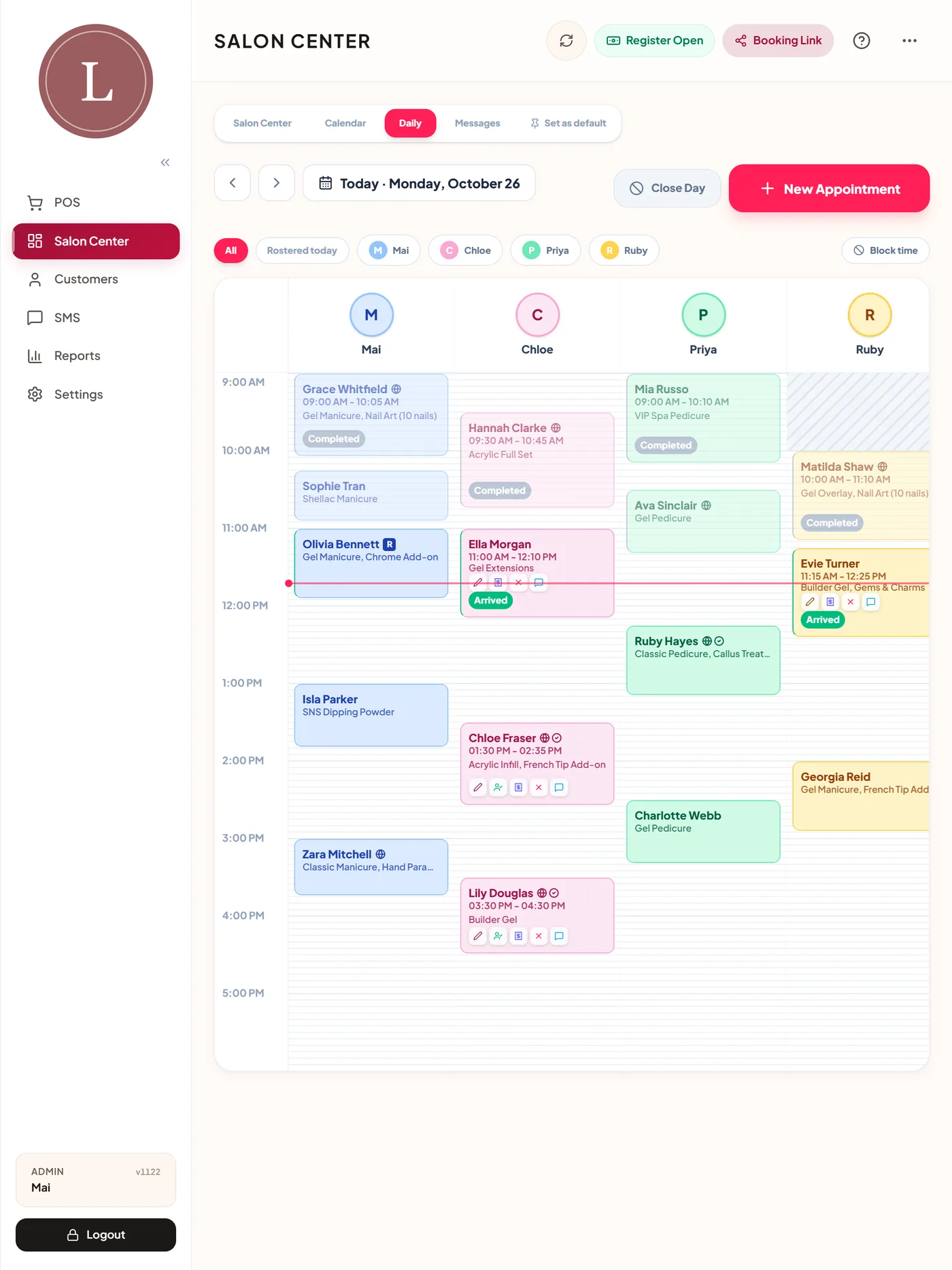
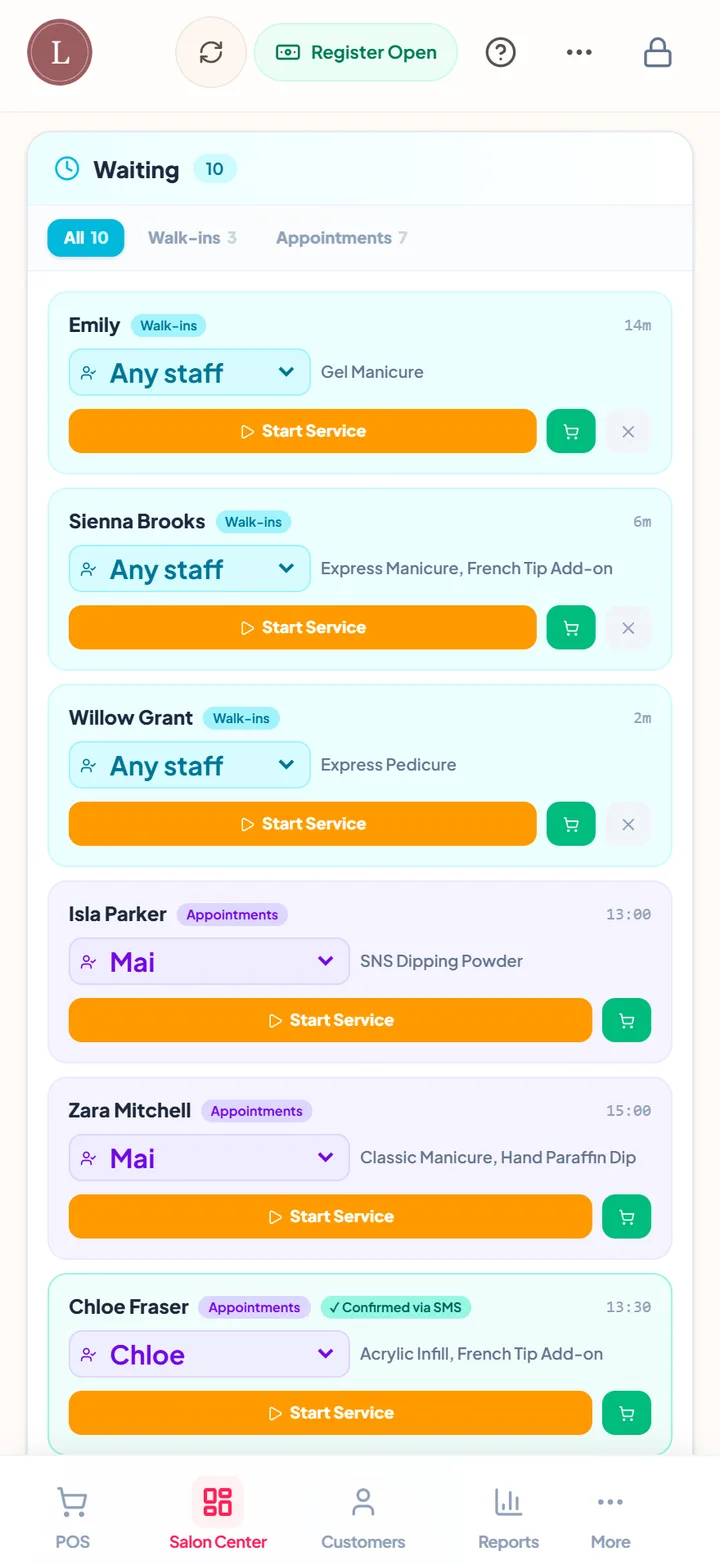
The app opens on Salon Center, the live view of the salon. Booked clients and walk-ins sit side by side: add a walk-in with their name and service, see how long they have been waiting, pick or change the technician, move them to "in service" and send them to the till when they are done. The desk never needs a paper list by the door.
A fair turn list for walk-ins
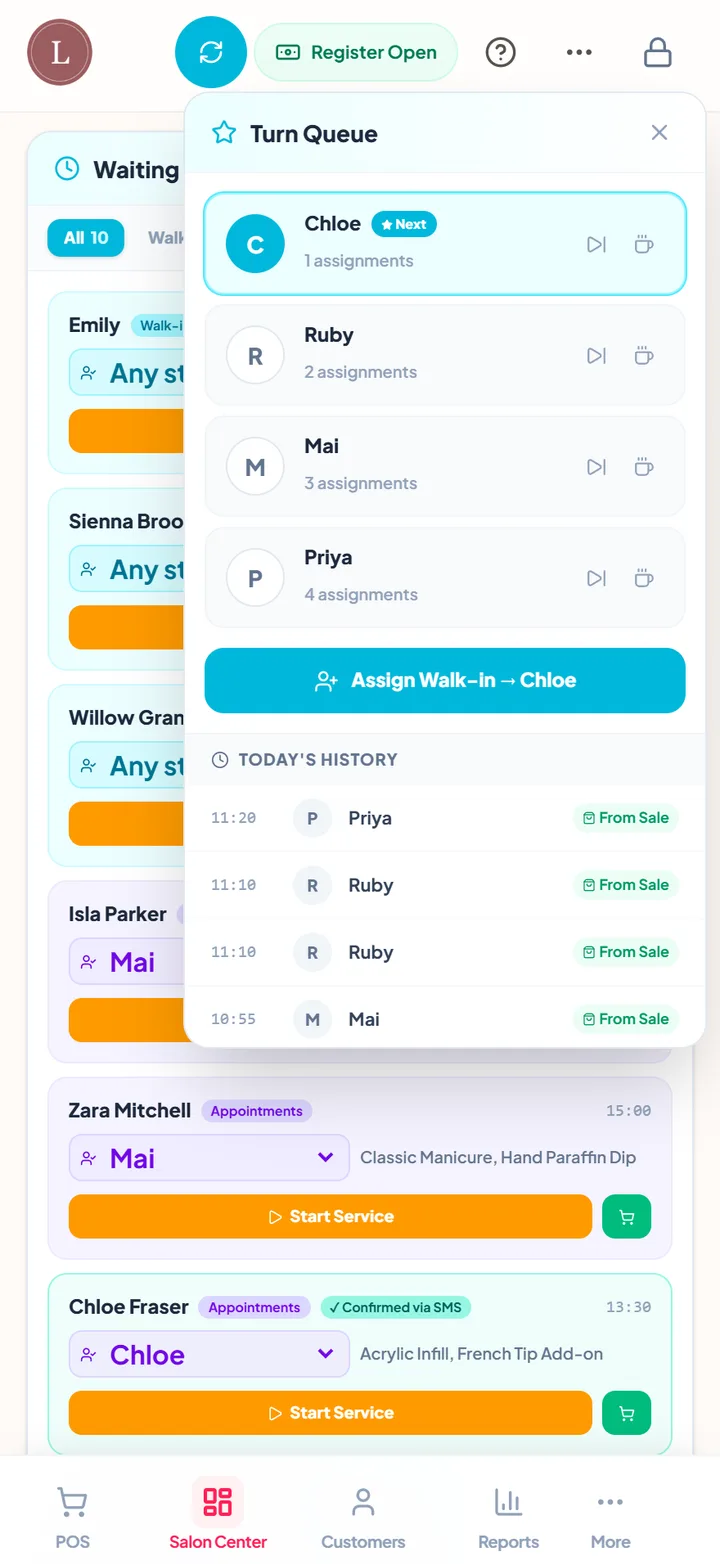
Switch on Turn Management and the turn list shows which technician is next: the one with the fewest turns today goes first. A technician can be skipped or put on a break, and the count starts again every day if you want it to. It ends the "whose turn is it" argument at the busiest time of day.
The day by technician
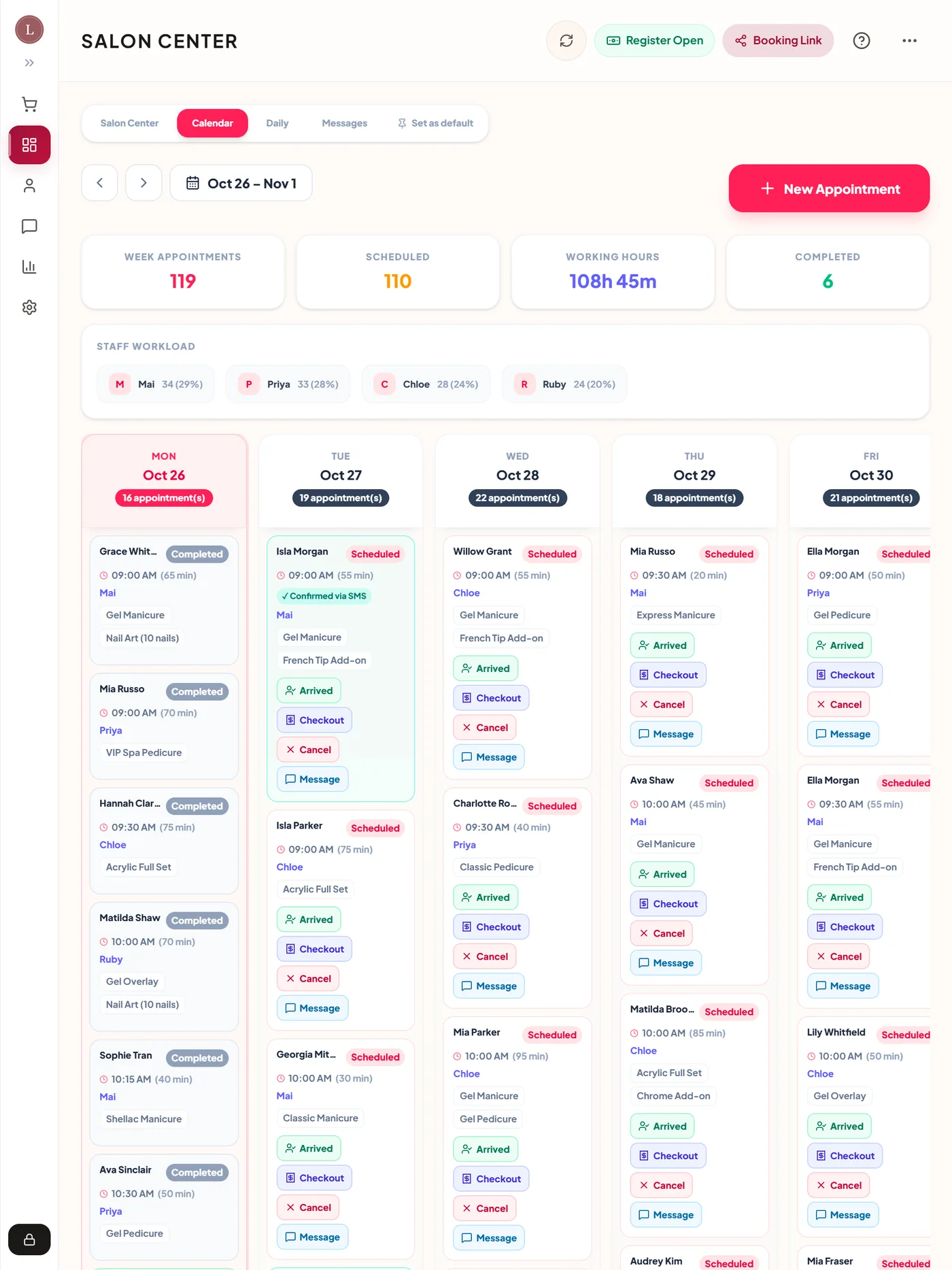
The staff board shows a column per technician with every appointment, colour-coded by service. Tap a booking to check it out, confirm it, mark the client arrived, change it, book the next visit or record a no-show. Markers show which bookings came in online, which are confirmed and which have notes. A warning appears before you double-book someone.
Mani-pedis with two technicians
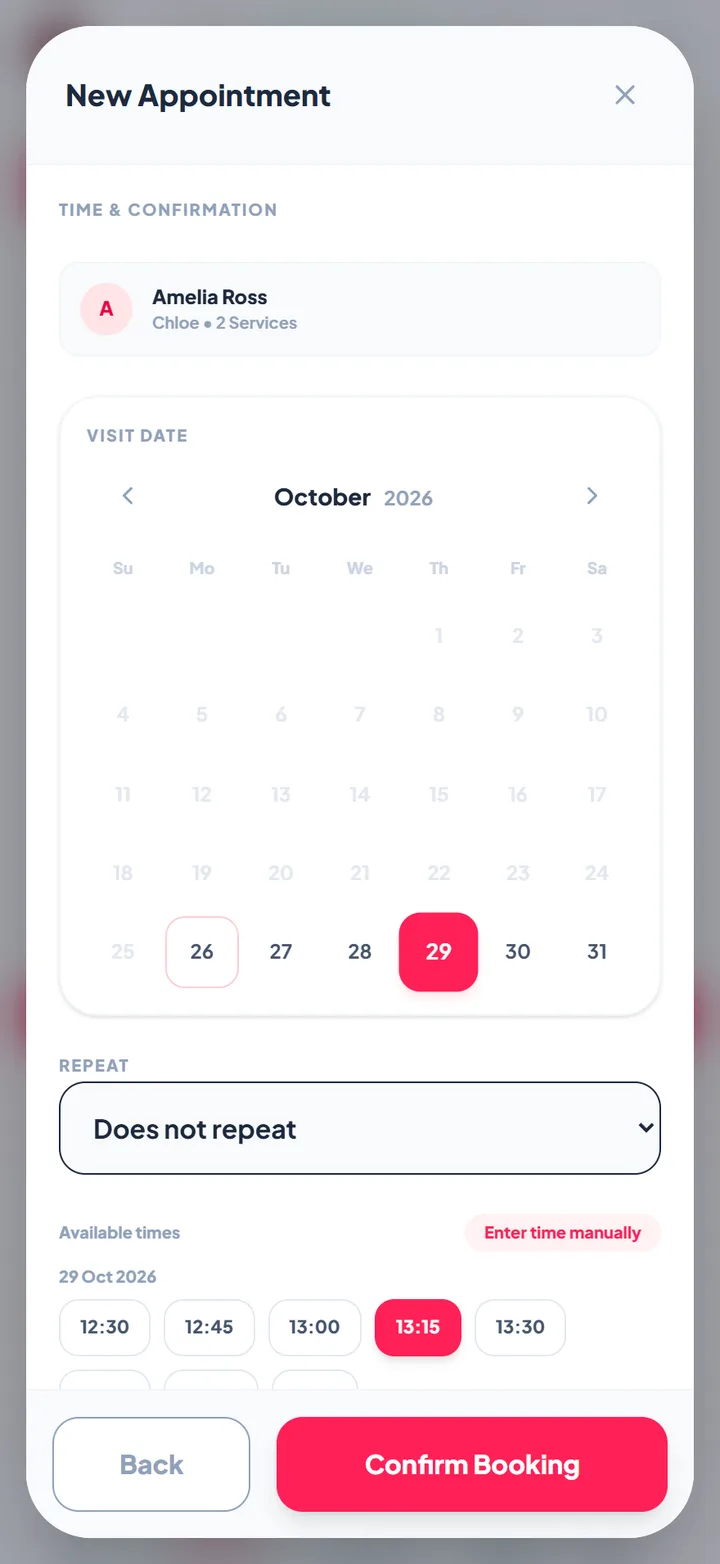
One appointment can hold several services shared between technicians, either at the same time (manicure and pedicure together) or one after the other. Online, "any technician" bookings can be assigned automatically to the free technician with the fewest bookings that day, so work is spread evenly.
Online booking with add-ons
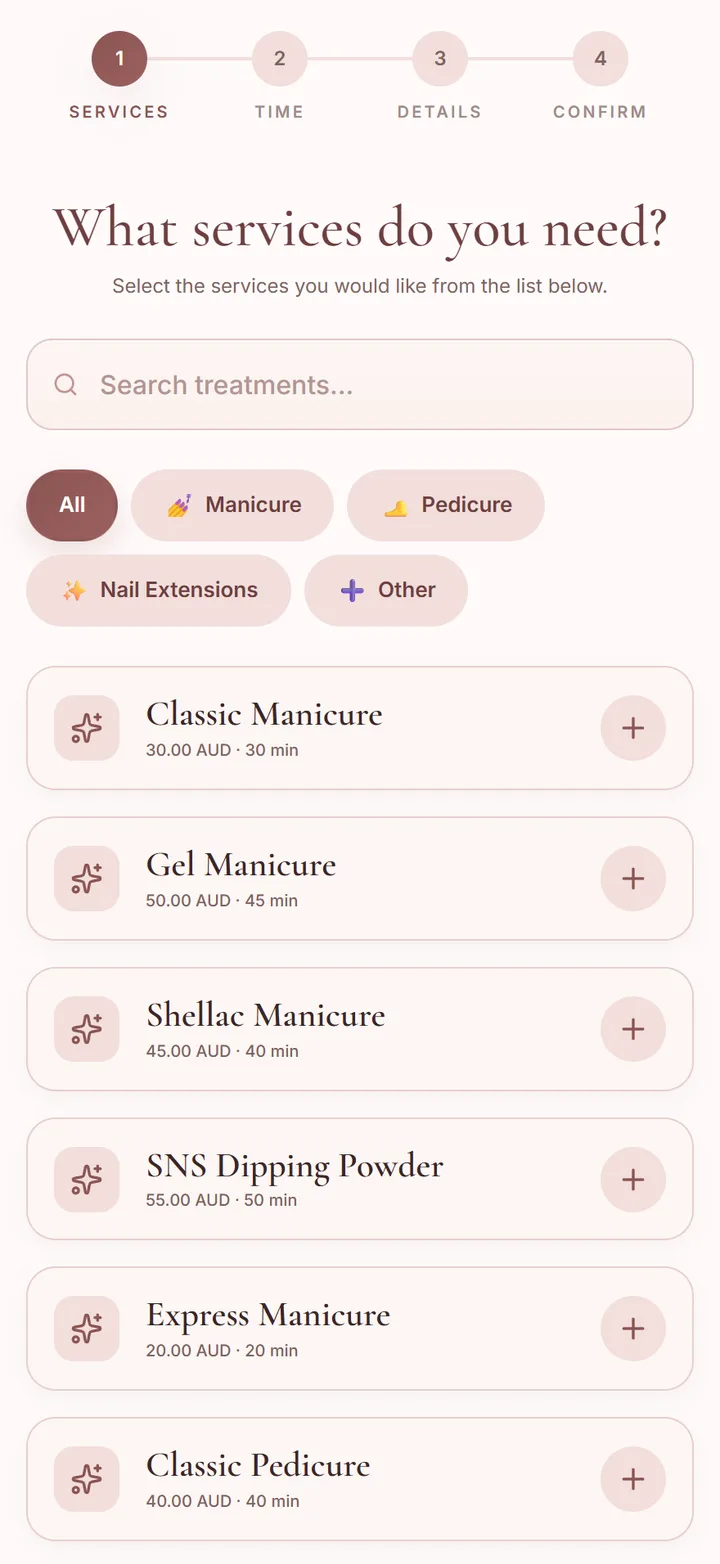
Your booking page lists your menu with prices and photos. Add-ons such as nail art, French tips, soak-off removal or paraffin are ticked alongside the main service they belong to, and the time and price update. Clients can jump to the first available time, and you can limit a service to chosen weekdays (for example nail art only when your artist is in) and set a gap between bookings for cleaning.

Deposits and no-show protection
Connect your own Stripe account and ask for a deposit, full payment or a saved card when clients book online, with different deposit amounts for busy dates such as the weeks before the holidays. Your cancellation policy is shown with the real cut-off for that booking, and the client ticks that they agree. If someone does not come, charge the no-show fee to their saved card from the appointment. Confirmations go out by WhatsApp or SMS, and clients can confirm or reschedule from their link.
Fast checkout
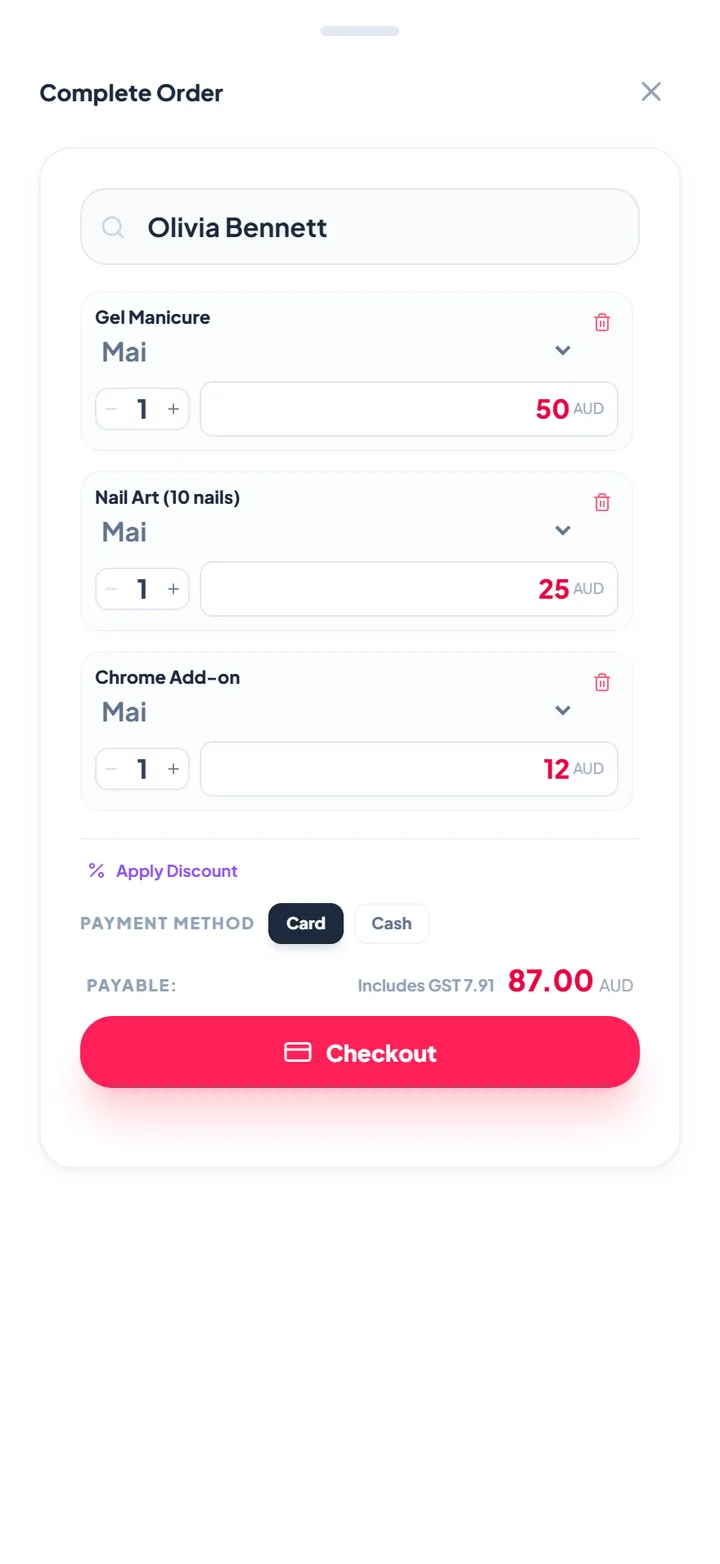
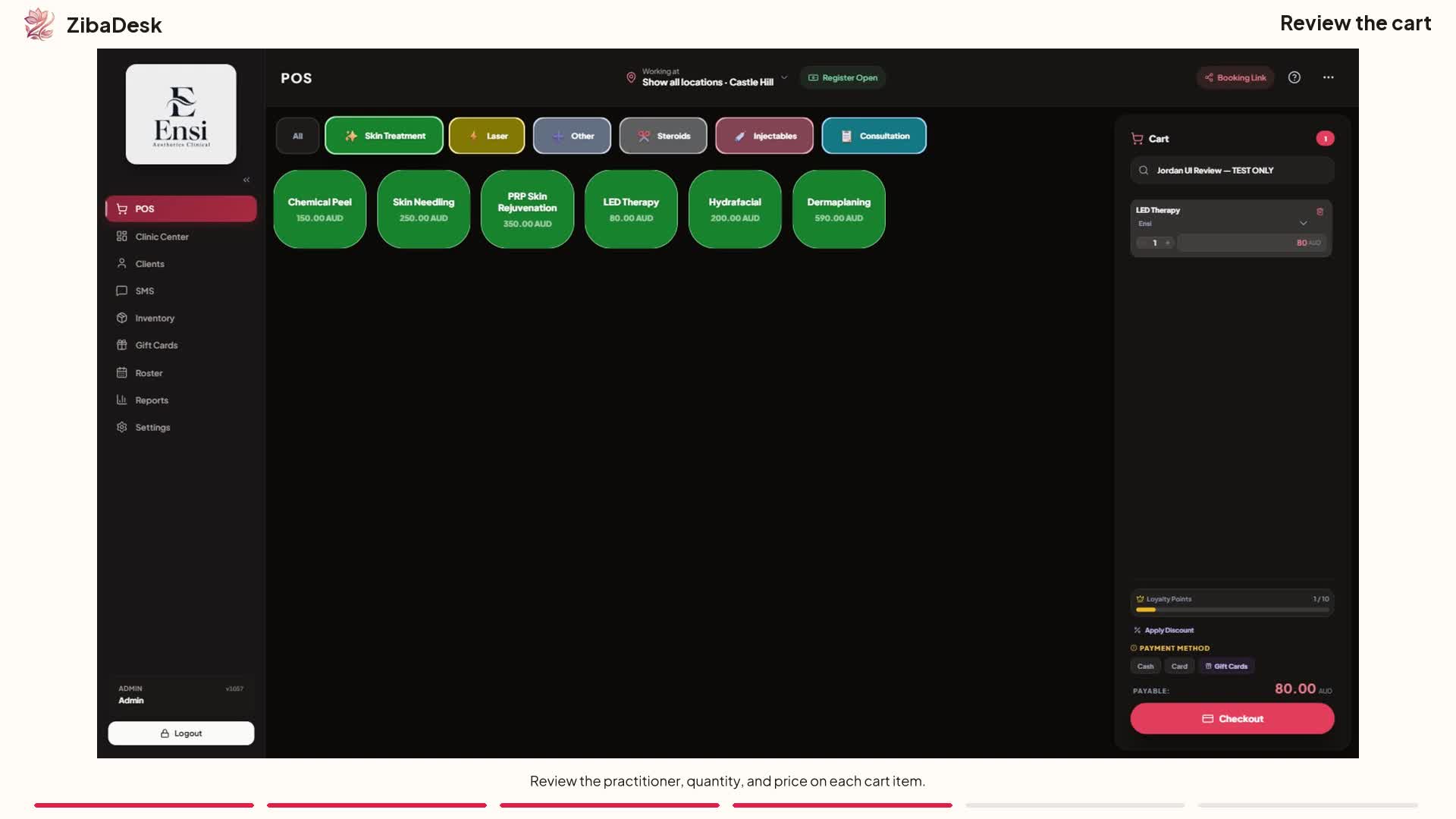
Check out an appointment or walk-in in a couple of taps. Change quantities and prices for nail art per nail, add retail products, apply a gift card, a loyalty reward, store credit or a prepaid package, and take cash, card or split payments. Cash rounding and a till helper that shows the change to give back speed up cash sales, and the till is counted and closed at the end of the day.
 Watch: Ringing up a sale in ZibaDesk
A client record that remembers the set
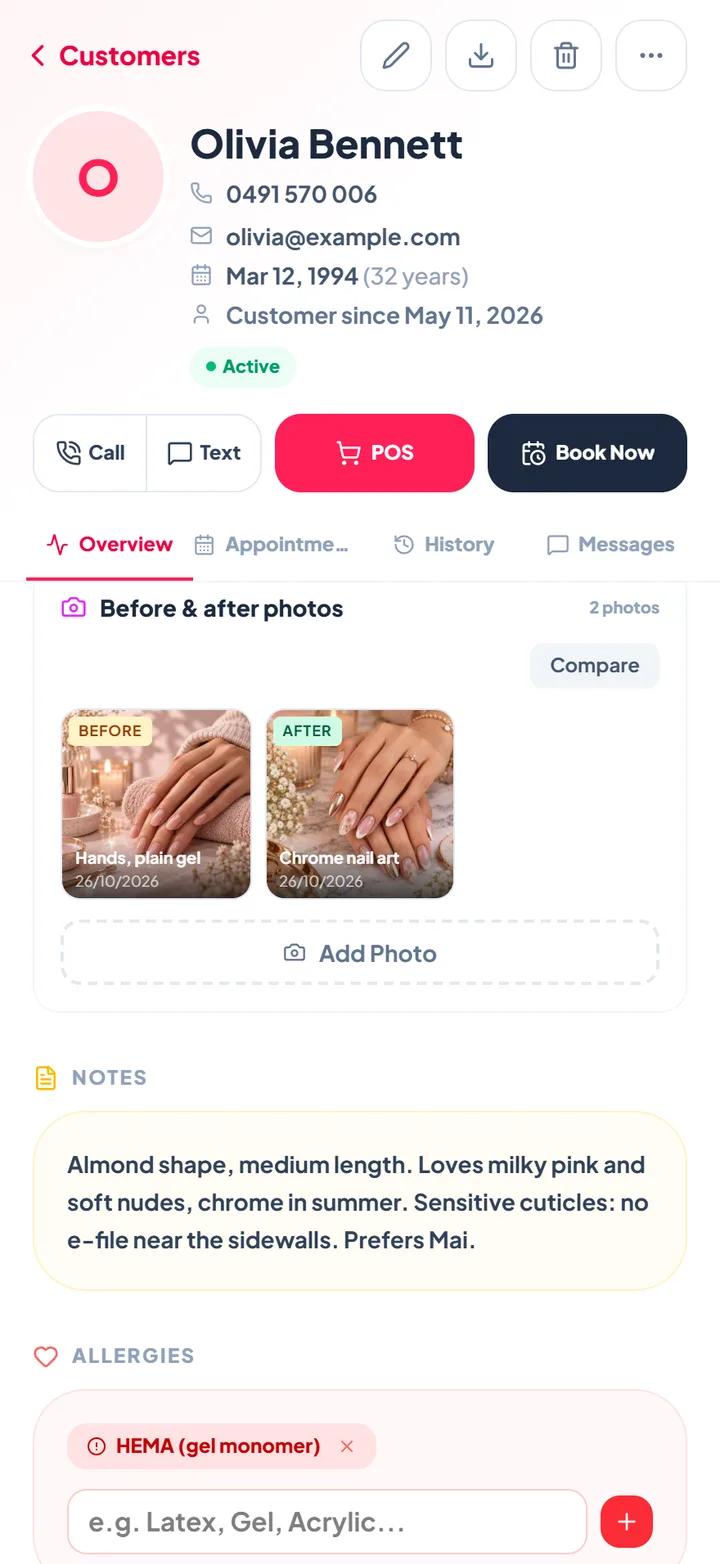
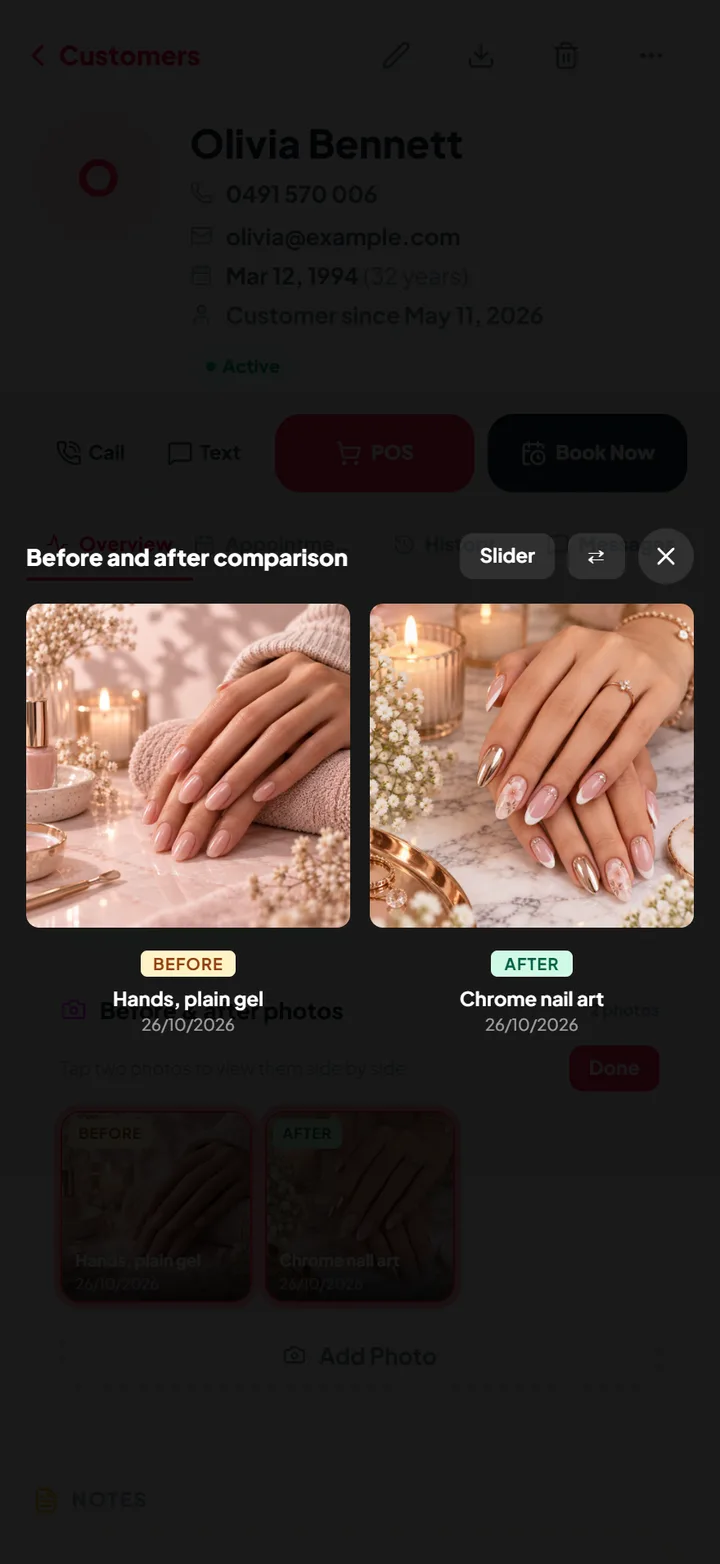
Each client's record holds notes for shape, length and favourite colours, allergies, their visit history and what they bought. Add before and after photos of their nails, with a tick for whether they agreed to you using them in your marketing. Any technician can repeat last month's set without asking.
Bringing clients back
Book the next fill before the client leaves with Book next, or set a repeat booking every week, every two weeks or every month. Send an SMS campaign to clients who have not visited in 60 days, and switch on a thank-you message after each visit with an optional short survey, whose answers appear in your reports.
Reports, commission and stock
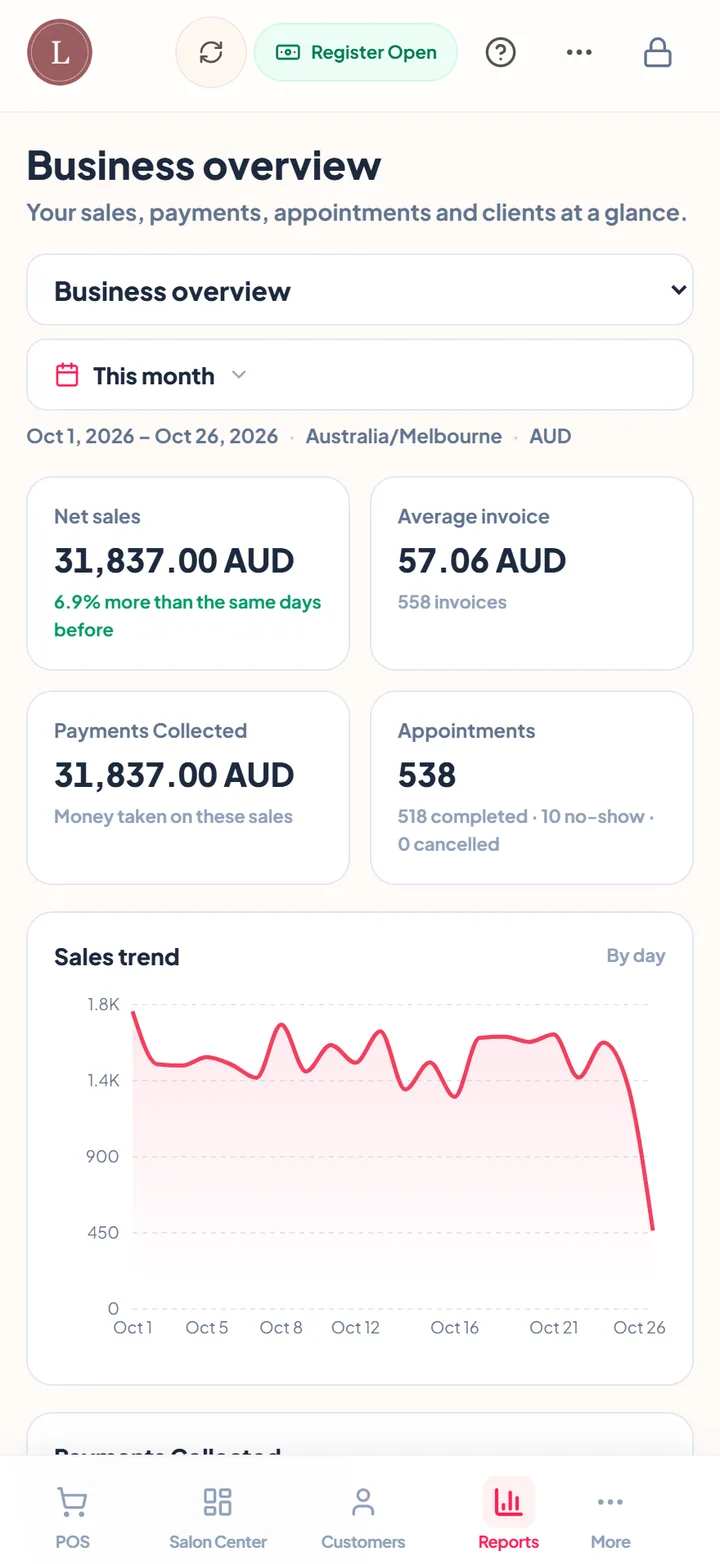
Reports show sales, services, each technician's takings, commission at the rate you set per person, clients, payment methods and till shifts, and most export to CSV. Inventory tracks retail polish, oils and care products with purchases, adjustments and barcode scanning.
In your team's language
Many nail teams speak Vietnamese, Korean, Chinese or another language before English. ZibaDesk runs in eleven languages: English, Vietnamese, Korean, Chinese, Persian, Arabic, French, German, Spanish, Filipino and Turkish, with right-to-left layouts for Persian and Arabic. Your booking page and the messages clients receive follow your business's settings.
Strengths
- Walk-ins, turns and appointments on one screen
- Mani-pedis shared between technicians
- Online add-ons, first available and auto-assign
- Deposits, card on file and no-show fees through your own Stripe
- Flat price per business, no commission on new clients
- Eleven languages, including Vietnamese, Korean and Chinese
Watch out for
- Tips are not recorded as a separate line
- No group booking for several clients in one step
- The turn list counts on one device at a time
Nail salon apps compared at a glance
What a salon with three technicians pays each month for the plan that includes online booking, from each vendor's own pricing page on 26 October 2026, plus the fees that come on top. Prices vary by country; Fresha's figure is from its Australian page.
| App | Three technicians, per month | Fees on top | Free trial | Business app languages |
|---|---|---|---|---|
| ZibaDesk | US$19.99 (Pro, up to 5 staff) | No commission on new clients; card fees at Stripe rates | 14 days, no card | 11, including Vietnamese, Korean and Chinese |
| Fresha | A$89.85 (Team, A$29.95 per member, Australia) | 20% on new marketplace clients (min A$8); card fees | 7 days, no card | English |
| Booksy | US$69.99 (US$29.99 + 2 x US$20) | Boost: 30% of a new client's first visit, up to US$100; card fees | 14 days, no card | 9, including Vietnamese and Chinese |
| Vagaro | About US$50 (US list, third-party figure) | Card fees; text marketing add-on | 30 days | English |
| GlossGenius | US$56 (Gold) | Card fees 2.4% + 15c in person | 14 days, no card | English |
| Square Appointments | Free; US$49 (Plus) for no-show fees and waitlist | Card fees 2.6% + 15c (Free) | Plus trial | English, French, Spanish, Catalan, Japanese |
| Mangomint | US$150 (US$120 + 3 x US$10) | Card fees 2.45% + 15c in person | Yes | English |
Sources: vendor pricing pages and App Store listings, read 26 October 2026. Vagaro's page showed an unlabelled price from our location, so its figure comes from third-party price guides. Check each vendor for your country.
2. Fresha: best for marketplace exposure
Fresha is a large beauty marketplace with free-to-start booking software. In 2026 it charges per team member (A$29.95 a month on the Team plan on its Australian page), plus a 20% one-time fee on new clients who book through the Fresha marketplace, with a minimum per booking. Returning clients and bookings from your own links carry no fee.
Strengths
- Large consumer marketplace
- Polished app and booking flow
- Payments built in
Watch out for
- Per-member price grows with the team
- New-client fees on marketplace bookings
- Reviewers report confusion over which bookings were charged
3. Booksy: marketplace on a simple plan
Booksy has one plan: US$29.99 a month plus US$20 for each extra staff member, with a 14-day trial. Its Boost feature lists you in its marketplace and charges 30% of a new client's first visit, capped at US$100. Its business app is available in nine languages, including Vietnamese and Chinese.
Strengths
- Simple, published pricing
- Marketplace for new clients
- Business app in nine languages
Watch out for
- US$20 for every extra technician
- Boost fees on new clients
- Reviewers mention hard-to-reach support
4. Vagaro: many modules, one system
Vagaro is a broad salon and spa system priced by bookable calendar: third-party price guides list about US$30 a month for one calendar plus US$10 for each extra, with a 30-day trial. Forms, marketing, payroll and more are available as add-ons, and it is very well reviewed.
Strengths
- Very broad feature set
- Long free trial
- Strong reviews
Watch out for
- Add-ons push up the real price
- Chat-only support can be slow
- Business app in English only
5. GlossGenius: polished for solo artists
GlossGenius is popular with US solo artists for its clean booking site and payments. Standard is US$28 a month and Gold, for teams of up to nine, is US$56, with a 14-day trial and no free plan.
Strengths
- Beautiful booking website
- Simple for one person
- Well reviewed
Watch out for
- US-focused
- English only
- Fewer walk-in and team tools
6. Square Appointments: the free starting point
Square Appointments has a genuinely free plan for online booking and staff calendars, with Plus at US$49 a month per location adding no-show fees, a cancellation policy and a waitlist. It is a natural choice if you already take payments with Square, but it is general booking software with nothing specific to nail salons, and card fees are part of the price of "free".
Strengths
- Free plan
- Reliable payments
- Easy setup
Watch out for
- No-show fees and waitlist need Plus
- Nothing nail-specific
- Fewer languages
What a nail salon app really costs
Nail salon apps charge in four ways: a monthly subscription, a charge per technician, a share of marketplace bookings and card processing. A cheap headline price can become the most expensive option once a five-technician salon pays per seat and a fee on every new client. Add up all four for your salon before you choose.
ZibaDesk Pro is US$19.99 a month per business for up to five staff, with online booking, deposits, the turn list, gift cards, loyalty rewards, WhatsApp confirmations and 100 SMS a month. Ultra is US$39.99 for unlimited staff and up to five locations. There is no commission on new clients, prices are shown in your own currency on our pricing page, and every account starts with 14 days of Pro free, no card needed. Card payments are processed by your own Stripe account at Stripe's rates.
The Saturday test: try any app this way
- Add four technicians and set one to start at noon.
- Add five walk-ins in a row. Can you see who is next, and how long each has waited?
- Book a mani-pedi with two technicians at the same time.
- Book online as a client: a gel manicure with nail art and a French tip. Did the time and price add up?
- Check out the gel manicure with nail art on eight nails and a gift card.
- Open the client's record. Can you see her shape and colour notes and last month's photo?
- Close the till. Does it balance?
- Add up the monthly cost for your real team, including per-staff, marketplace and card fees.
Moving your nail salon to ZibaDesk
- Sign up and choose the nail salon type; your menu starts from our nail template, which you edit.
- Or photograph your price list and use Import from photo in Settings to turn it into services.
- Import your clients from a spreadsheet exported from your current app.
- Add your technicians, their hours and their commission rate, and switch on Turn Management if you take walk-ins.
- Connect Stripe for deposits, choose your booking page style and colours, and share your link.
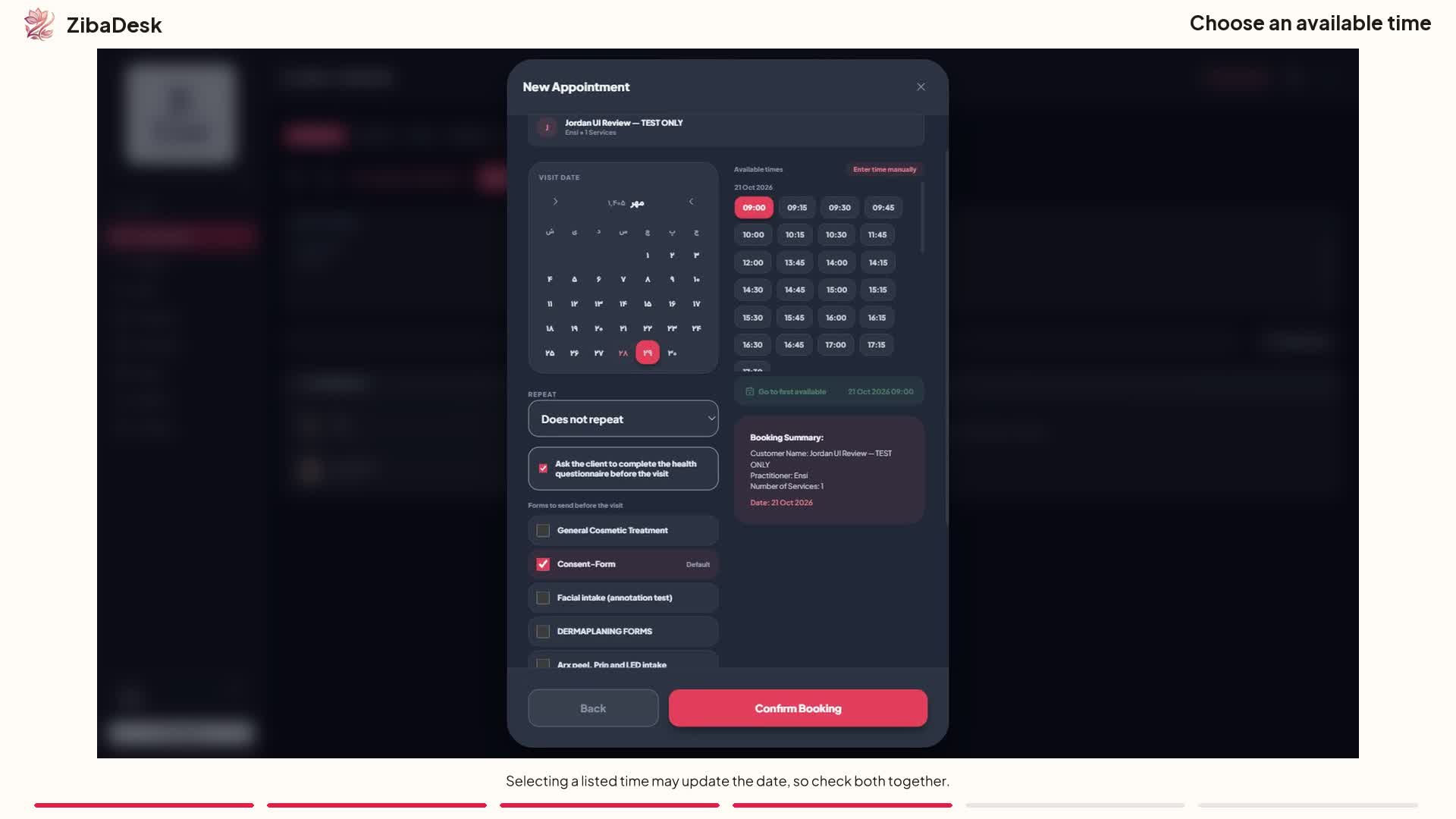 Watch: Booking an appointment in ZibaDesk
Frequently asked questions
What is the best nail salon management app in 2026?
For most independent nail salons we recommend ZibaDesk: it puts walk-ins, a turn list, appointments, online booking with add-ons, deposits and checkout in one app, for US$19.99 a month per business with no commission on new clients. Salons that want a consumer marketplace to find new clients may also consider Fresha or Booksy, and should budget for their new-client fees.
How do nail salons manage walk-ins and turns?
In ZibaDesk, walk-ins are added to Salon Center next to the booked clients, with their wait time and technician. With Turn Management on, the turn list puts the technician with the fewest turns today next, and you can skip someone or put them on a break.
Can clients add nail art when they book online?
Yes. Add-ons such as nail art, French tips or removal are linked to the main services they go with, and clients tick them on the booking page so the time and price are right.
Can two technicians do a manicure and pedicure at the same time?
Yes. One appointment can hold several services shared between technicians, either at the same time or one after another.
Does ZibaDesk charge a fee for new clients?
No. ZibaDesk charges a flat subscription per business. There is no commission on new or returning clients; card payments go through your own Stripe account.
Is ZibaDesk available in Vietnamese?
Yes. ZibaDesk runs in eleven languages, including Vietnamese, Korean, Chinese, Spanish, Persian and Arabic.
ZibaDesk publishes this guide, so we rank our own app first and say so. Competitor prices and features come from each vendor's own website, checked in October 2026, and they change often: check the vendor before you decide. Product names belong to their owners, and ZibaDesk is not affiliated with them. Screens show sample businesses with fictional clients.